You capture a crisp product shot or professional portrait, upload it to a typical "free" online cutout utility, and wait ten seconds while your image transmits to an unverified remote server. Instead of a clean production-ready asset, the platform presents a blurry, 500-pixel downsampled preview stamped with a diagonal watermark. Unlocking the full-resolution cut requires purchasing monthly subscription tokens or entering credit card details. Even worse, your proprietary product prototype, private headshot, or confidential ID document now sits permanently in a third-party cloud storage bucket.
Extracting subjects from backgrounds does not require transmitting sensitive graphics across the public internet. Modern web browsers run high-throughput WebAssembly (Wasm) routines, SIMD vector instructions, and hardware-accelerated HTML5 Canvas operations directly on your computer or smartphone GPU. Earnova Optics operates as a 100% private, zero-upload transparent background maker. It processes full-resolution 4K and 8K photography directly inside your local browser memory sandbox with zero watermarks, zero subscription queues, and zero bandwidth overhead.
Test the live in-browser background remover right here to extract instant transparent PNG cutouts with pixel-level precision:
The Hidden Costs and Privacy Risks of Cloud Cutout Services
Traditional Software-as-a-Service (SaaS) background removal platforms rely on an obsolete client-server architecture engineered around recurring subscription monetization rather than processing efficiency:
By executing segmentation locally within browser memory, you circumvent every one of these operational bottlenecks.
How In-Browser Background Segmentation Works
Operating an automatic background removal tool directly on client hardware demands a disciplined memory model and optimized pixel math. Rather than transmitting files to remote server clusters, the browser allocates a dedicated computational sandbox inside system RAM.
[ Source Image: JPG / PNG / WebP / BMP — Native Resolution ]
                           │
                           ▼
┌────────────────────────────────────────────────────────────┐
│              Sandboxed Browser Memory (RAM)                │
│  • FileReader API decodes local binary ArrayBuffer         │
│  • OffscreenCanvas initializes exact source dimensions     │
│  • Zero network egress — 0 KB transmitted to external APIs │
└────────────────────────────────────────────────────────────┘
                           │
                           ▼
┌────────────────────────────────────────────────────────────┐
│             Pixel Segmentation & Edge Engine               │
│  • Euclidean color-distance scanning across 32-bit RGBA    │
│  • Breadth-First Search (BFS) boundary flood-fill pass     │
│  • Sub-pixel alpha matte feathering & anti-aliasing        │
└────────────────────────────────────────────────────────────┘
                           │
                           ▼
┌────────────────────────────────────────────────────────────┐
│               Lossless 32-bit Canvas Buffer                │
│  • Alpha values: 0 (transparent) to 255 (fully opaque)     │
│  • Original Red, Green, and Blue channels fully preserved  │
│  • Zero compression artifacts or resolution downsampling   │
└────────────────────────────────────────────────────────────┘
                           │
                           ▼
[ Transparent PNG Output — Native 4K/8K Resolution, Instant Download ]
1. In-Memory Canvas Decoding
When you drag an image into Earnova Optics, the browser triggers the HTML5FileReader interface, converting the raw file stream into a typed Uint8ClampedArray. An internal OffscreenCanvas is initialized at the exact pixel dimensions of your original file. A 24-megapixel photograph taken on a modern mirrorless camera (6000×4000 pixels) allocates an uncompressed 96-megabyte RGBA raster buffer in local memory. No downscaling occurs.
2. Euclidean Color-Distance Segmentation
To determine whether an individual pixel belongs to the unwanted background or the foreground subject, the engine computes the three-dimensional Euclidean color distance between the sampled backdrop reference color \((R_0, G_0, B_0)\) and the candidate pixel \((R_i, G_i, B_i)\):$$\Delta E = \sqrt{(R_i - R_0)^2 + (G_i - G_0)^2 + (B_i - B_0)^2}$$
The user-controlled Color Tolerance parameter sets the boundary threshold \(\tau\). If \(\Delta E < \tau\), the pixel matches the background and its alpha channel is marked for clearance.
3. Boundary Flood-Fill and Contour Extraction
Simple global color thresholding can mistakenly erase interior subject details that share similar color values with the background (such as white buttons on a shirt set against a white studio wall). To prevent interior clipping, the segmentation engine utilizes a boundary-connected Breadth-First Search (BFS) flood-fill algorithm.The flood-fill originates strictly from the outer image perimeters, traversing adjacent coordinate neighbors:
$$(x \pm 1, y) \quad \text{and} \quad (x, y \pm 1)$$
By confining the mask traversal to exterior-connected paths, interior highlights remain fully protected and 100% opaque.
4. Alpha Feathering and Edge Anti-Aliasing
Binary cutouts produce harsh, jagged stair-stepping (aliasing) along curved subject boundaries. To deliver natural, studio-quality cutouts, our edge-refinement module applies fractional alpha gradients across a defined transition band \([\tau_{\text{inner}}, \tau_{\text{outer}}]\):$$\alpha = \text{clamp}\left(\frac{\Delta E - \tau_{\text{inner}}}{\tau_{\text{outer}} - \tau_{\text{inner}}}, 0, 1\right) \times 255$$
Pixels near the outer boundary receive fractional transparency values, blending the subject seamlessly when composited over new backdrops, dark banners, or vibrant marketing layouts.
High-Quality HD vs Compressed Previews: The Resolution Problem
The intense global search demand for terms like "ai background remover hd" and "transparent background maker high quality" stems from widespread user dissatisfaction with aggressive downsampling on commercial platforms.
Cloud providers must pay recurring infrastructure costs for GPU compute time and server egress bandwidth. Processing a 24-megapixel image through an unoptimized cloud neural network requires significant server memory and compute cycles. To minimize infrastructure bills, commercial platforms downscale images to 500×500 pixels (0.25 megapixels) before processing, producing cutouts suitable only for tiny website avatars. When users attempt to print these files or place them on large e-commerce hero banners, the cutouts appear visibly pixelated and soft.
Cloud AI Tool:     [ 6000×4000 Photo ] ──► Downsampled to [ 500×500 px ] ──► Blurry Free Cutout
Earnova Optics:    [ 6000×4000 Photo ] ──► In-Browser RAM [ 6000×4000 px ] ──► Crisp 24MP PNG Cutout
Because Earnova Optics utilizes client-side hardware acceleration, computational workloads execute on the user's local CPU and GPU. There is zero server infrastructure cost per image processed. Consequently, our engine processes the image at its genuine native sensor resolution. Every single pixel from your original camera sensor or digital canvas is preserved, providing authentic HD and 4K transparent PNG downloads completely free of charge.
Bulk Background Removal for E-Commerce and Product Catalogs
Online retailers and e-commerce managers frequently handle catalog updates requiring dozens or hundreds of product cutouts. Searching for "background remover bulk images free" and "batch process transparent png" reflects the urgent need for scalable, cost-effective catalog workflows.
The Cost of Cloud API Batch Pipelines
Commercial background removal APIs (such as remove.bg or PhotoRoom) charge between $0.15 and $0.90 per image processed. For a medium-sized online boutique launching a new collection of 500 apparel items, preparing product photos through a cloud API costs between $75 and $450 per batch. Furthermore, transmitting hundreds of raw product images consumes gigabytes of upstream internet bandwidth, slowing down overall production.Multi-Threaded In-Browser Batch Architecture
Earnova Optics solves batch bottlenecks by delegating image segmentation jobs to independent Web Worker threads running concurrently across your processor's hardware cores:Batch Upload: [item1.jpg] [item2.jpg] [item3.jpg] [item4.jpg] ... [item20.jpg]
│
▼
┌──────────────────────────────────────────────────────────┐
│ Web Worker Pool (Parallel CPU Cores) │
│ Thread 1 ──► item1.jpg ──► transparent_01.png (32ms) │
│ Thread 2 ──► item2.jpg ──► transparent_02.png (29ms) │
│ Thread 3 ──► item3.jpg ──► transparent_03.png (35ms) │
│ Thread 4 ──► item4.jpg ──► transparent_04.png (28ms) │
└──────────────────────────────────────────────────────────┘
│
▼
[ Batch ZIP Archive — All 20 Cutouts, Instant Download ]Each worker thread receives an isolated pixel raster, applies the Euclidean color segmentation pass, generates the alpha channel, and returns a processed Blob. On a standard 8-core desktop computer or modern M-series MacBook, a queue of 20 high-resolution product shots processes in parallel in just a few seconds. The completed cutouts can be saved individually or archived into a single compressed ZIP package with zero server charges.
Visual Mobile Walkthrough: 3 Steps to Clean Transparent Cutouts
Follow this step-by-step visual guide to cut out backgrounds and export clean transparent PNG assets directly on any smartphone, tablet, or desktop browser using Earnova Optics:
Step 1: Upload Your Source Photo Directly in the Browser
Open the Earnova Optics Background Remover workstation on your mobile or desktop device. Tap the primary upload container to browse photos from your camera roll, photo library, or local file manager. You can also drag and drop single images or batch folders directly into the dropzone.
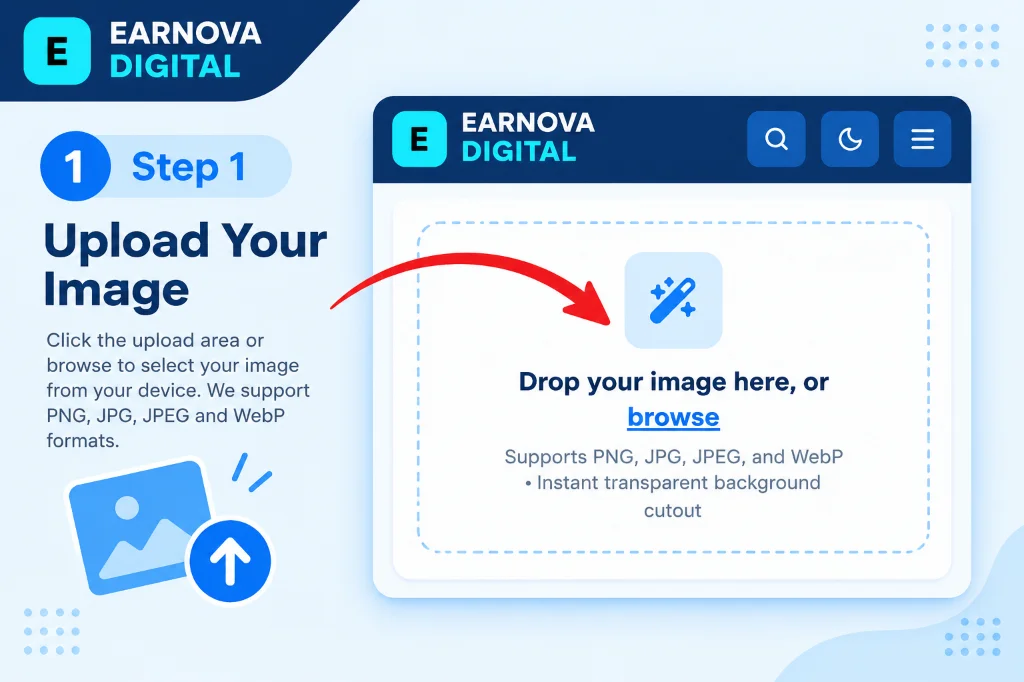
Step 1: Tap the upload zone or drag and drop your photo directly into the client-side browser container.
Earnova Optics reads your image file into local memory using HTML5 Canvas and typed array buffers. Unlike legacy cloud cutout sites, zero bytes are uploaded to external servers. Your private photographs, commercial product mockups, and client materials stay entirely on your device, ensuring total privacy and instantaneous file loading.
Step 2: Calibrate Color Tolerance and Refine Subject Edges
Once your image loads into the interactive workstation, the segmentation engine immediately analyzes boundary pixels. Adjust the Color Tolerance slider and edge refinement brush to achieve the cleanest separation between foreground and background:
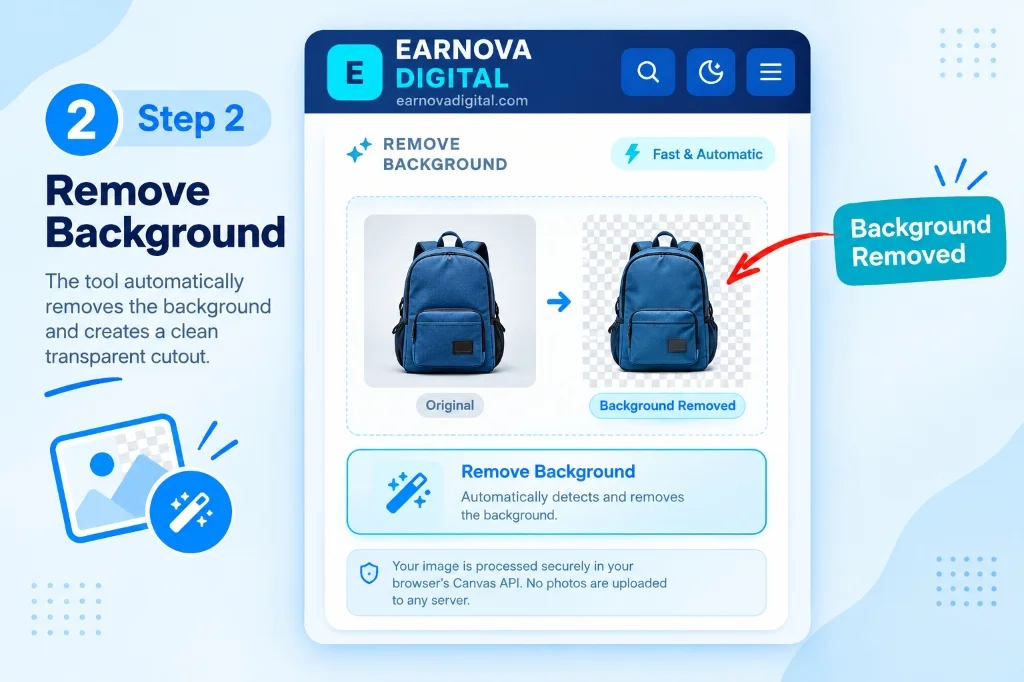
Step 2: Adjust the color tolerance threshold and edge refinement controls to cleanly isolate subject borders.
Calibrate the tolerance threshold according to your photo's backdrop composition:
Step 3: Download Your High-Resolution Transparent PNG
Review your cutout on the live transparency checkerboard grid. The checkerboard pattern clearly reveals whether any background residue remains around the subject edges. When your cutout is refined to your satisfaction, tap the download button:
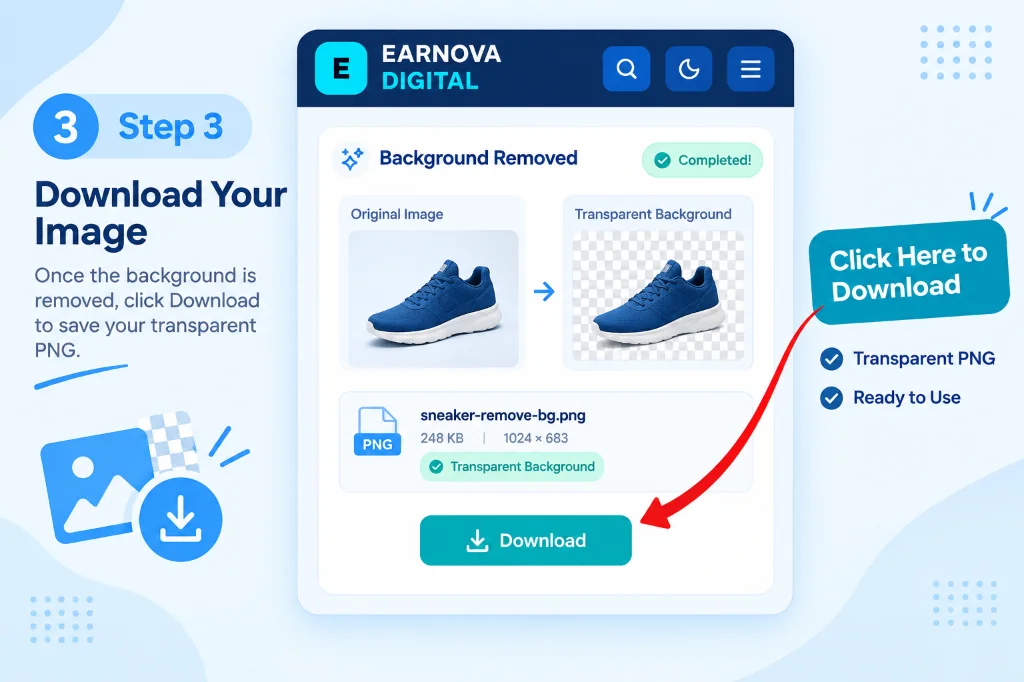
Step 3: Verify the clean transparent alpha matte and tap Download to save your full-resolution 32-bit PNG.
Click the solid Download button to instantly save your lossless 32-bit PNG file. The transparent image is immediately ready for use in e-commerce stores, presentation slides, marketing flyers, or digital graphic layouts.
Video Tutorial: How to Remove Background from Image Online Without Losing Quality
Prefer a visual video demonstration? Watch this step-by-step walkthrough detailing how to remove photo backgrounds cleanly and export transparent PNGs with full edge sharpness:
Step-by-step visual tutorial: Clean background removal and transparent PNG export.
Amazon, Shopify, and Social Media Graphics: E-Commerce & Creative Workflows
A clean transparent PNG cutout serves as the foundation for modern digital design, e-commerce merchandising, and identity documentation.
1. Amazon Listing Compliance: Pure White Background (#FFFFFF)
Amazon enforces stringent main image standards for all product listings. The primary product photo must showcase the merchandise against a pure white background (#FFFFFF, RGB 255, 255, 255). Even minor off-white tones (such as RGB 250, 250, 250 or slight warm gray tints) trigger automated listing suppression by Amazon's catalog auditing algorithms.
To achieve 100% Amazon compliance using Earnova Tools:
#FFFFFF white.2. Shopify and Custom E-Commerce Storefronts
For modern direct-to-consumer (DTC) storefronts built on Shopify, WooCommerce, or BigCommerce, transparent PNG or WebP cutouts enable dynamic visual consistency. By utilizing transparent product cutouts, your catalog imagery automatically adapts to seasonal theme changes, subtle background gradients, or dark-mode UI toggles without requiring you to re-shoot your merchandise.3. Rapid Marketing Design in Canva, Figma, and Photoshop
Creating high-converting social media ads, YouTube video thumbnails, and promotional banners requires isolating subjects from cluttered backgrounds. Exporting clean cutouts from Earnova Optics allows you to drag transparent PNG layers directly into Canva, Figma, or Adobe Photoshop. You can add drop shadows, bold outline strokes, vibrant gradient backdrops, and promotional badges in seconds without needing costly design software subscriptions.4. Official Passport, Visa, and ID Photo Standards
Government passport authorities and visa application portals mandate strict background color standards. While the United States requires an off-white or white background, many nations (including Pakistan, Bangladesh, the United Arab Emirates, and several European Union member states) mandate a uniform light-blue background conforming to ISO/IEC 19794 standards (approximately hex#90C0E4 or #A8C8E8).
To generate an official passport photo:
Cutout Format Comparison Matrix
Selecting the proper file format determines whether your cutouts blend seamlessly into web layouts or suffer from unsightly edge artifacts and excessive file weights:
| Format & Preset | Alpha Channel Support | Average File Size | Edge Anti-Aliasing Quality | Optimal Use Cases | Platform Compatibility |
| :--- | :--- | :--- | :--- | :--- | :--- |
| PNG-32 (Lossless Cutout) | Full 8-bit Alpha (256 levels) | 350 KB – 1.8 MB | Crisp, smooth sub-pixel feathering | High-res product catalogs, UI overlays, print assets | 100% Universal (Shopify, Amazon, eBay, Print) |
| WebP Alpha (Modern Web) | Full 8-bit Alpha (Lossy & Lossless) | 80 KB – 420 KB | Excellent gradient transparency | Production web storefronts, mobile apps, blogs | 97%+ Global browser support (Chrome, Safari, Edge) |
| AVIF Alpha (Next-Gen) | Full 8-bit / 10-bit Alpha | 55 KB – 280 KB | Superior boundary preservation | High-traffic e-commerce landing pages | Chromium, Safari 16.4+, Firefox 113+ |
| JPG (Solid White Composite) | No Alpha (Flattened RGB) | 120 KB – 550 KB | Crisp edge against pure #FFFFFF | Marketplace listings, email newsletters, print proofs | 100% Universal legacy support |
Edge Execution on iPhone, Android, and Desktop Browsers
Mobile users frequently search for "remove background from image iphone" and "transparent background maker canva alternative no paywall" to find capable mobile editing solutions without downloading heavy native apps from app stores.
iOS Safari on Apple Silicon
Safari on iOS 16 and later includes a high-performance WebAssembly engine with native SIMD (Single Instruction, Multiple Data) support. On iPhone 12 and newer devices (powered by Apple A14 Bionic and later chips), hardware-accelerated Canvas operations route computational loads through WebKit's GPU rasterization pipeline.On an iPhone 14 or 15, a 12-megapixel photograph completes background segmentation in approximately 200 to 350 milliseconds. The resulting transparent PNG saves directly into the iOS Files app or Photos camera roll via standard browser download APIs. There are no 80MB app downloads, no invasive camera permission prompts, and no recurring mobile subscriptions.
Chrome on Android via Skia GPU Pipeline
Android devices running modern Google Chrome benefit from the V8 JavaScript engine and hardware-accelerated Canvas 2D rendering powered by Google's Skia graphics pipeline. Mid-range and flagship Android smartphones process high-resolution photography with near-desktop responsiveness.Desktop Browsers: Concurrent Worker Threads
On desktop Chrome, Mozilla Firefox, Microsoft Edge, and Apple Safari, Earnova Optics automatically scales across all available physical and virtual CPU cores. High-volume batch jobs divide workloads evenly among background Web Workers, enabling professional studio photographers and digital marketers to process entire product catalogs without browser tab freezing.Solving Difficult Cutout Edge Cases
Extracting subjects with complex contours or challenging lighting requires specific calibration techniques:
1. Eliminating Green Spill and Color Halos
When subjects are photographed against saturated green screens or colored studio backdrops, boundary pixels often retain a thin tint of the background color (known as "color spill" or fringing). To eliminate this halo:2. Handling Fine Hair, Fur, and Fiber Strands
Fine hair and animal fur feature semi-transparent strands where background and foreground colors blend at sub-pixel levels. A hard binary cutout abruptly truncates these strands, resulting in an unnatural "helmet" effect. Earnova Optics solves this by calculating fractional alpha gradients using Euclidean color differentials. For the cleanest results, ensure your original shot maintains strong lighting contrast between hair highlights and the backdrop.3. Preserving Semi-Transparent Glass and Reflections
Translucent subjects like glassware, perfume bottles, and sunglasses transmit background light directly through the foreground object. Calibrate your tolerance slider to a lower threshold (8 to 12) to isolate foreground reflections and structural edges while allowing natural ambient transparency to pass through.Data Privacy & Architecture Comparison Matrix
Understanding the difference between in-browser RAM execution and cloud-hosted background erasers is crucial when handling sensitive photography and proprietary commercial assets:
| Technical Metric | Client-Side Local RAM (Earnova Optics) | Cloud API Erasers (remove.bg / SaaS Portals) |
| :--- | :--- | :--- |
| Server Storage Risk | Zero Risk: Files never leave local device memory. Data clears automatically on tab close. | High Risk: Images are transmitted over public networks and stored in remote cloud buckets. |
| Resolution Downscaling | None: Processes original 4K/8K sensor resolution without compression. | Aggressive: Free tiers downscale images to 0.25 MP (500×500 px) previews. |
| Credit & Subscription Cost | 100% Free: Unlimited exports with zero credits, subscriptions, or paywalls. | Costly: Charges $0.20 to $1.99 per full-resolution download credit. |
| Batch Processing Speed | Parallel Multi-Core: Concurrent Web Workers process queues at local hardware speed. | Sequential Queues: Limited by network upload bandwidth and remote server throttling. |
| Data Compliance | Full Compliance: Meets strict GDPR, HIPAA, and corporate data confidentiality standards. | Varies: Requires thorough review of third-party data retention and ML training policies. |
Frequently Asked Questions
How do I remove the background from an image online for free?
Open Earnova Optics, drag your photo into the dropzone, and let the in-browser segmentation engine isolate your subject. Adjust the color-tolerance slider to refine edges, then click Download to export a clean, 32-bit transparent PNG with zero server uploads, watermarks, or credit paywalls.Will removing the background reduce the original quality or resolution of my photo?
No. Unlike cloud services that downsample free images to 500-pixel previews, Earnova Optics initializes an HTML5 Canvas buffer at your image's exact source dimensions. Whether processing 12MP smartphone photography or 48MP studio captures, your exported transparent PNG retains 100% of its original sensor resolution and pixel sharpness.How do I save a picture with a transparent background?
Save your image in a format that supports an alpha channel, primarily 32-bit PNG, WebP, or AVIF. Formats like JPEG do not support transparency and automatically fill clear areas with solid white or black. Earnova Optics exports standard lossless 32-bit PNG files compatible with all modern graphic and web software.Is it safe to process confidential or personal photos in this background remover?
Yes, completely safe. The entire segmentation engine runs locally in your web browser's sandboxed RAM via WebAssembly and Canvas APIs. No pixel data travels across the internet or touches external servers, making it ideal for confidential prototypes, personal identification documents, and sensitive corporate assets.Why do cloud background removers blur fine hair details?
Cloud services compress uploaded files to save bandwidth and compute costs, destroying delicate edge gradients before segmentation begins. Binary alpha cutoffs create harsh jagged borders or blur fine strands into muddy patches. Earnova Optics computes fractional Euclidean alpha values on full-resolution rasters, preserving delicate hair contours cleanly.Can I use transparent PNG cutouts directly for Shopify and Amazon product listings?
Yes. Shopify and modern web storefronts natively support transparent PNG and WebP images. For Amazon main product listings requiring a pure white#FFFFFF background, converting your transparent PNG to JPG via EarnovaPixel automatically composites the subject over pure white, satisfying marketplace compliance guidelines.
Stop paying monthly subscription fees and exposing private photos to cloud servers. Use Earnova Optics to remove backgrounds from images online for free, create transparent PNG cutouts in full HD resolution, and prepare compliant product photography directly in your browser tab.